> ## Documentation Index
> Fetch the complete documentation index at: https://docs.coregamehd.com/llms.txt
> Use this file to discover all available pages before exploring further.
# upscale ภาพในเกมด้วย Magpie
เกมเอโรเกะเก่าๆ หรือแม้แต่เกมในยุคปัจจุบันหลายเกมมาพร้อมกับภาพความละเอียด 720p (1280 x 720 px) ส่งผลให้ภาพไม่คมชัดเท่าที่ควรเมื่อนำไปแสดงผลในจอภาพที่มีความละเอียดสูง
Magpie เป็นโปรแกรมที่ช่วยขยายภาพ (upscale) ในเกมเอโรเกะให้มีความละเอียดสูงขึ้น ทำให้ภาพคมชัดกว่าเดิมหลายเท่า มองเห็นความแตกต่างได้อย่างชัดเจน
### Requirements
โปรแกรม Magpie รองรับ
* Windows 10 เวอร์ชั่น 1903 ขึ้นไป
* Windows 11 ทุกเวอร์ชั่น
### Download
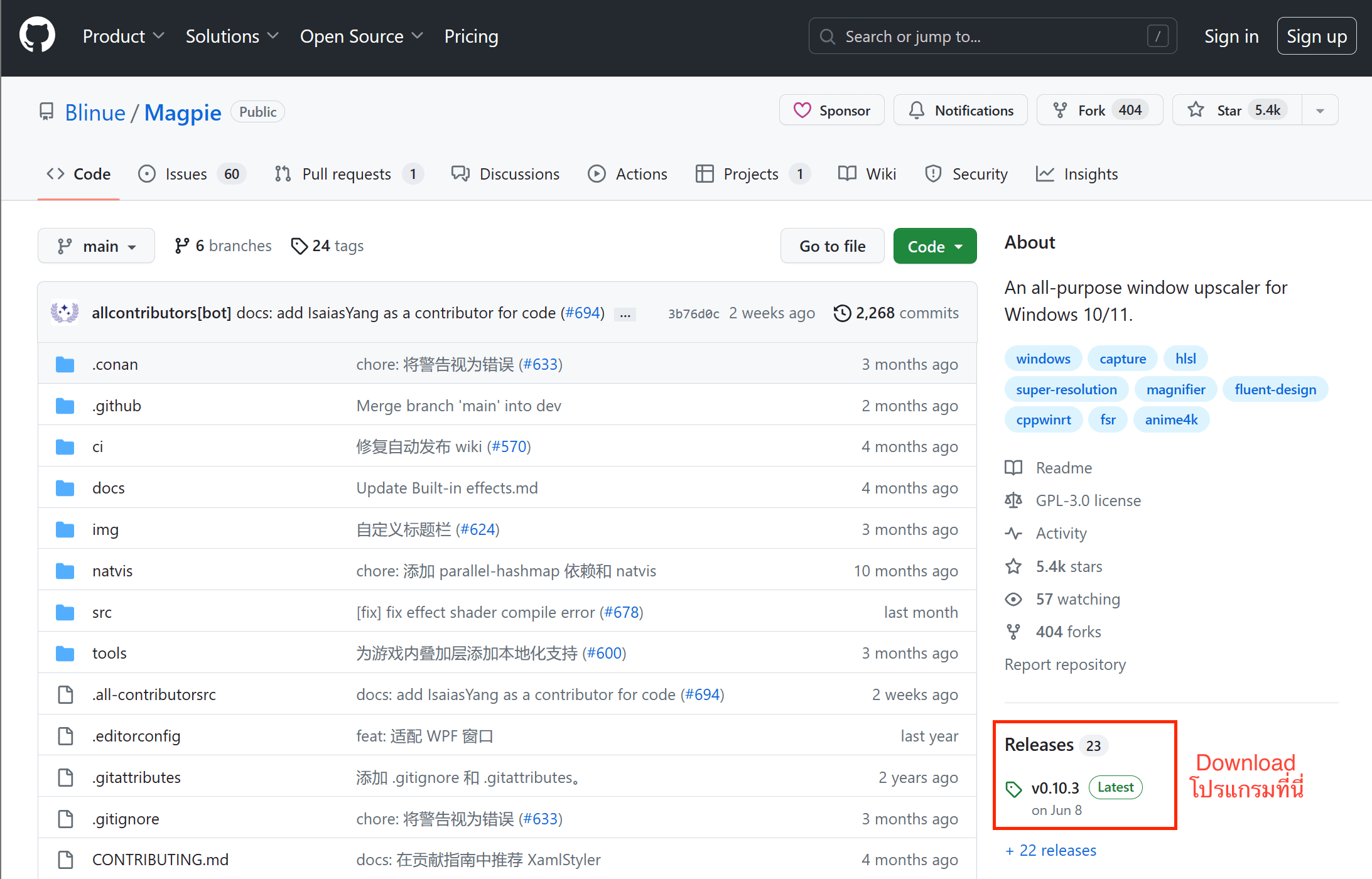
ดาวน์โหลดโปรแกรม Magpie ได้ที่ [https://github.com/Blinue/Magpie](https://github.com/Blinue/Magpie)
คลิ๊กตรง Release --> จากนั้นเลือกเวอร์ชั่นล่าสุดที่มีในขณะนั้น (ตัวอย่างคือ `v0.10.3`) --> แล้วคลิ๊ก `Magpie_v0.10.3.zip` เพื่อทำการดาวน์โหลดโปรแกรม
 ### Installation
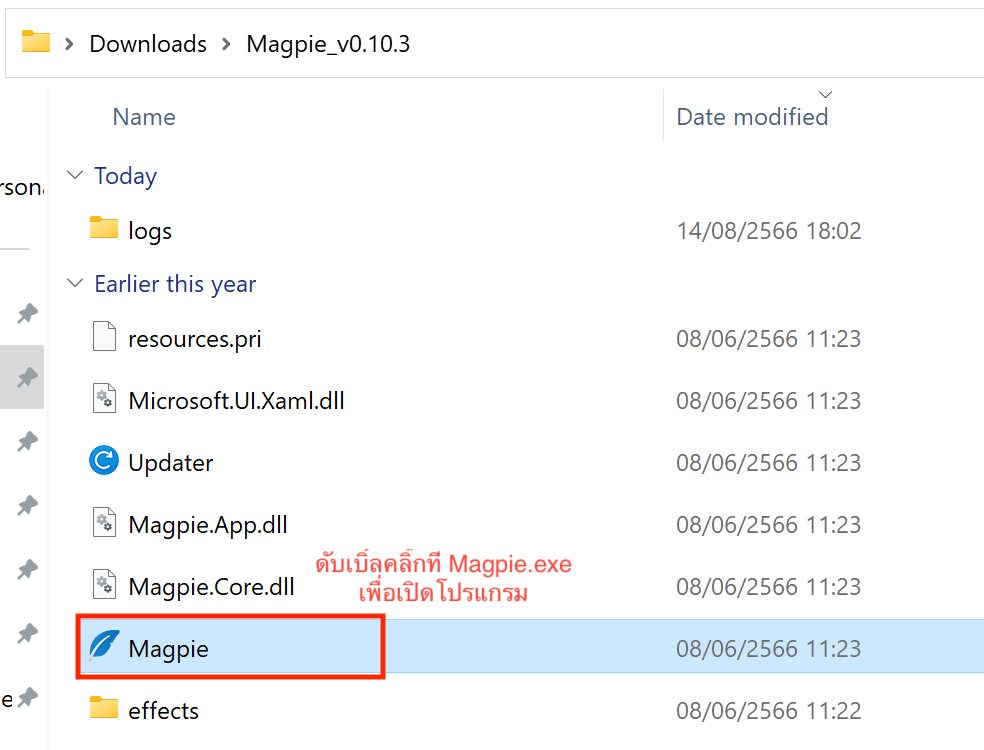
1. แตกไฟล์ zip ที่ดาวน์โหลดไว้ --> จากนั้นดับเบิ้ลคลิ๊กที่ **Magpie.exe**
### Installation
1. แตกไฟล์ zip ที่ดาวน์โหลดไว้ --> จากนั้นดับเบิ้ลคลิ๊กที่ **Magpie.exe**
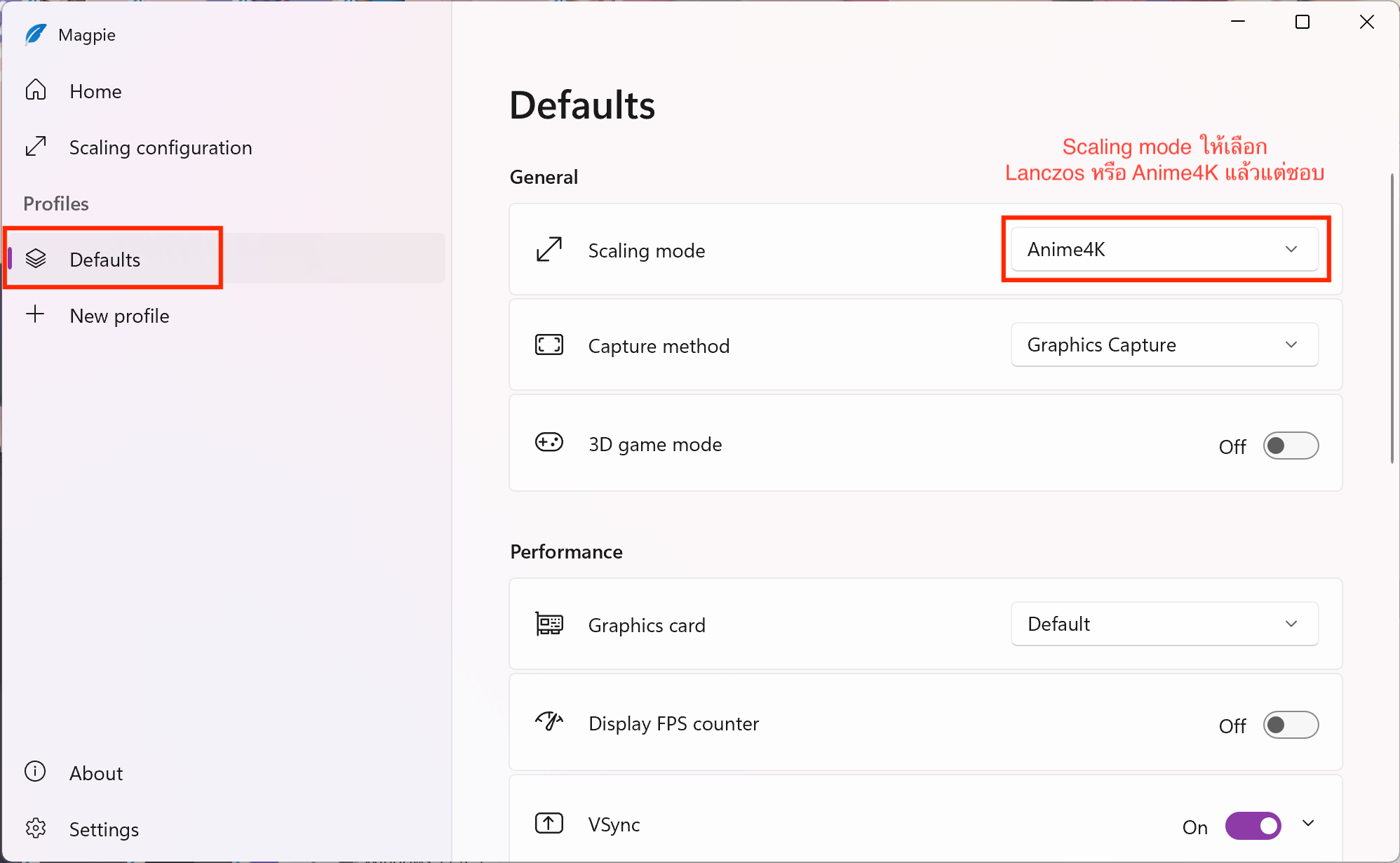
 2. เลือกที่ Profile --> **Defaults**
3. บริเวณ General --> **Scaling Mode** ให้เลือกเป็น **Lanczos** หรือ **Anime4K** แล้วแต่ชอบ
2. เลือกที่ Profile --> **Defaults**
3. บริเวณ General --> **Scaling Mode** ให้เลือกเป็น **Lanczos** หรือ **Anime4K** แล้วแต่ชอบ
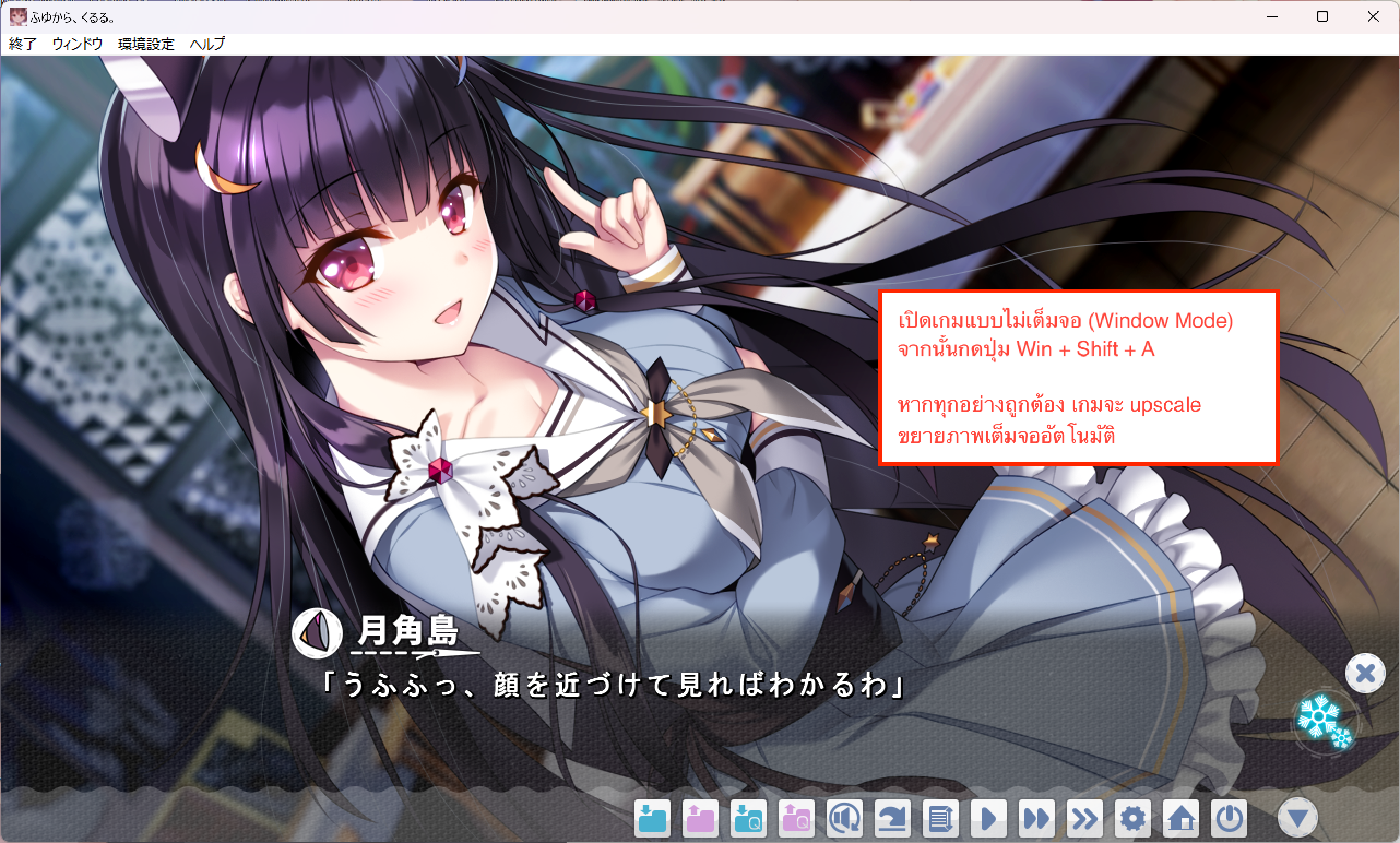
 4. เปิดเกมแบบไม่เต็มจอ (Window Mode) จากนั้นกดปุ่ม `Win` + `Shift` + `A`
หากทำทุกอย่างถูกต้อง เกมจะ upscale ขยายเต็มจอโดยอัตโนมัติ
4. เปิดเกมแบบไม่เต็มจอ (Window Mode) จากนั้นกดปุ่ม `Win` + `Shift` + `A`
หากทำทุกอย่างถูกต้อง เกมจะ upscale ขยายเต็มจอโดยอัตโนมัติ
 ### Tips
เพื่อความสะดวกในการใช้งาน แนะนำให้ตั้งค่าให้โปรแกรม Magpie เริ่มทำงานเมื่อเปิดคอมพิวเตอร์โดยอัตโนมัติ
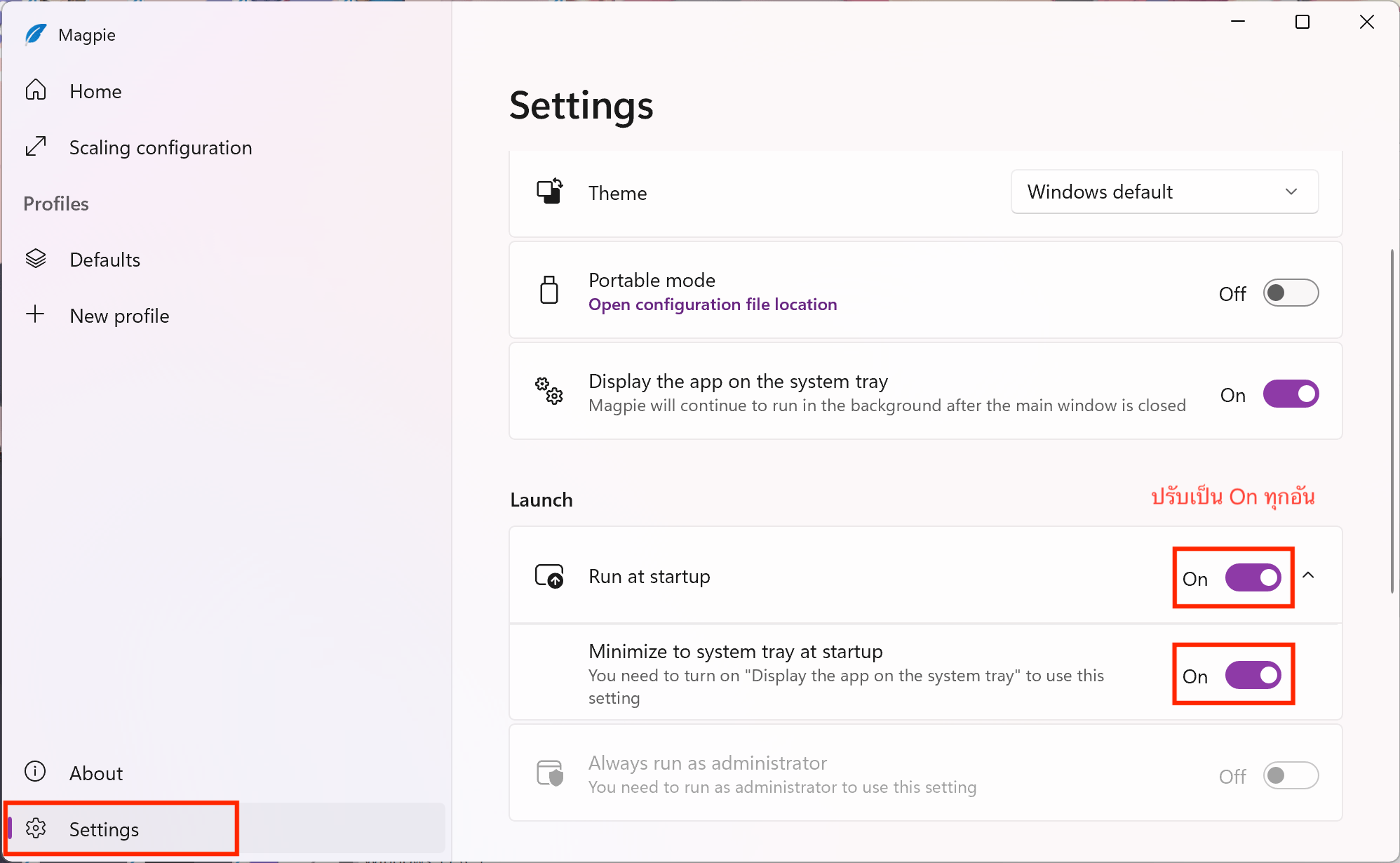
ไปที่ **Settings** ของโปรแกรม Magpie จากนั้นตั้งค่าตามนี้
* Run at Startup ปรับเป็น **On**
* Minimize to system tray at startup ปรับเป็น **On**
### Tips
เพื่อความสะดวกในการใช้งาน แนะนำให้ตั้งค่าให้โปรแกรม Magpie เริ่มทำงานเมื่อเปิดคอมพิวเตอร์โดยอัตโนมัติ
ไปที่ **Settings** ของโปรแกรม Magpie จากนั้นตั้งค่าตามนี้
* Run at Startup ปรับเป็น **On**
* Minimize to system tray at startup ปรับเป็น **On**
 ### ข้อจำกัด
เมื่อทำการ upscale เกม อาจพบปัญหาดังต่อไปนี้
* รู้สึกหน่วงเมื่อขยับเมาส์ ยังไม่พบวิธีแก้ไข
* การแสดงผลข้อความกระพริบ แก้ได้ด้วยการปรับ Text Speed เป็น 100% หรือสูงสุดเท่าที่สามารถปรับได้
* หากใช้โน้ตบุ๊ค พัดลมอาจดังเพราะโปรแกรม Magpie กินทรัพยากรเครื่องมากขึ้น
### ข้อจำกัด
เมื่อทำการ upscale เกม อาจพบปัญหาดังต่อไปนี้
* รู้สึกหน่วงเมื่อขยับเมาส์ ยังไม่พบวิธีแก้ไข
* การแสดงผลข้อความกระพริบ แก้ได้ด้วยการปรับ Text Speed เป็น 100% หรือสูงสุดเท่าที่สามารถปรับได้
* หากใช้โน้ตบุ๊ค พัดลมอาจดังเพราะโปรแกรม Magpie กินทรัพยากรเครื่องมากขึ้น